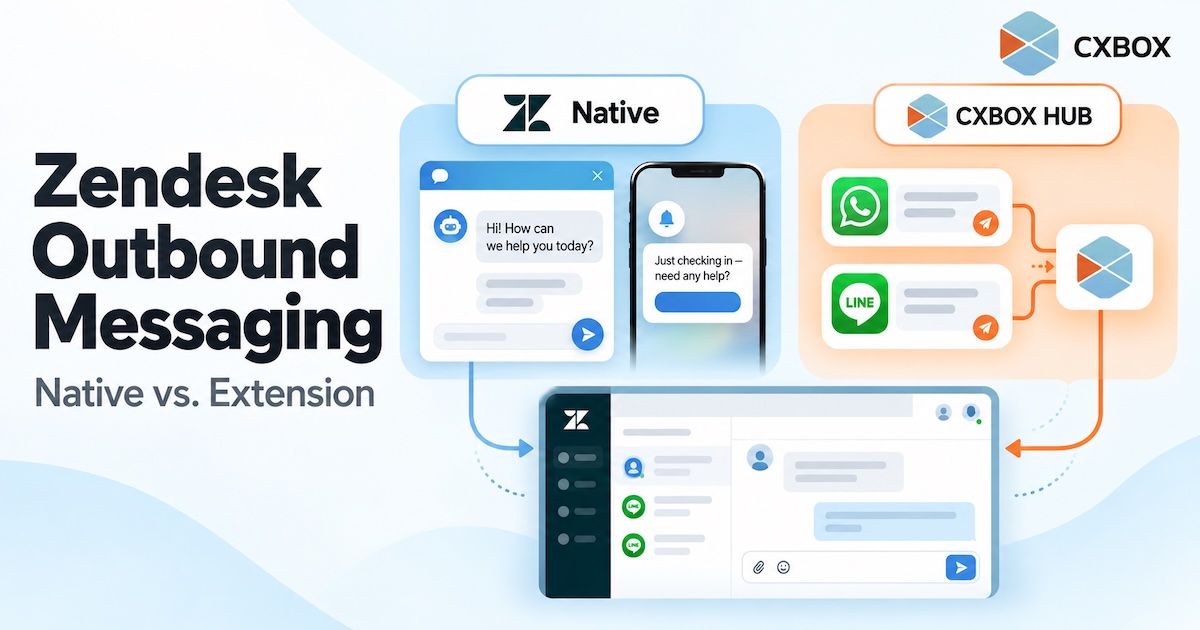
“Can Zendesk send outbound messages?” The honest answer is yes—but the answer changes with the channel, the number of recipients, and the workflow you want to run.
Quick answer: Zendesk has native proactive messages for its Web Widget and mobile SDK, and its messaging platform offers APIs for certain outbound use cases. It can also send ticket-related notifications. A marketer-friendly campaign workflow for segmented, multi-channel messaging is a separate requirement: it may call for an app, an integration or custom development. Zendesk’s own Marketplace includes options such as Relay by Zendesk Labs and CXBOX HUB.
A website prompt shown to a visitor, an appointment reminder sent to one customer, and a LINE campaign sent to 20,000 followers are all “outbound.” They are different jobs. Treating them as the same feature is where software comparisons become misleading.
The short comparison
| What you want to do | What Zendesk offers | Do you need more? |
|---|---|---|
| Show a proactive message to a website or app visitor | Native proactive messages for Web Widget and mobile SDK, based on configured conditions. | Often no, if those channels and the available conditions fit. |
| Send a ticket-related email or SMS notification | Support workflows and triggers can send service notifications through configured channels. | Often no for a service notification; this is not a marketing campaign manager. |
| Programmatically send an outbound WhatsApp or SMS message | Zendesk messaging platform APIs support defined outbound methods on supported channels. | Usually requires developer work or an app to connect data, timing and sending. |
| Run segmented WhatsApp or SMS campaigns through a campaign interface | Relay by Zendesk Labs is an app on Zendesk Marketplace for WhatsApp and SMS campaigns. | Yes—Relay is an app, not a native Admin Center campaign feature. |
| Run segmented campaigns across channels such as LINE and WhatsApp and connect replies to service | Zendesk can be the conversation and service layer; CXBOX HUB adds segmentation, campaign management and channel integration. | Yes—an extension such as CXBOX HUB and the relevant channel configuration. |
| Send a bulk email marketing campaign or newsletter from Support | Zendesk says Support does not include a native mass-email campaign function. | Yes—use an appropriate campaign app or email marketing platform. |

What Zendesk does natively
Proactive messages on your website and mobile app
Zendesk’s proactive messages can start a conversation when a visitor meets conditions you define. They are designed for the messaging Web Widget and mobile SDK channels. A visitor can respond, and the interaction can be handed to an agent or a configured AI agent. This is useful for an onboarding prompt, a help offer on a page, or a timely message inside an app.
There is a firm channel boundary: Zendesk’s documentation says this native proactive-messages feature does not support social messaging channels. Configuring a website proactive message does not turn it into a WhatsApp or LINE campaign.
Service notifications and programmable outbound
Zendesk also supports outbound service communication through configured ticket workflows and messaging APIs. Its outbound messaging documentation describes a Notification API for supported channels including WhatsApp, Twilio and MessageBird. The API can address a phone number and associate the message with a conversation. These capabilities give developers building blocks; they are not, by themselves, a complete marketer-facing journey designer with audience management and reporting.
Channel rules still apply. For example, a business-initiated WhatsApp message outside the permitted conversation window may need an approved template. Account entitlement, channel setup, recipient eligibility and implementation determine what can actually be sent.
What an extension adds
An outbound campaign requires more than a send button. Someone must select an eligible audience, manage templates or content, prevent inappropriate repeat sends, choose timing, observe channel limits, and see which customer replies need follow-up.
There is more than one extension path. Relay by Zendesk Labs is a Marketplace app focused on bulk WhatsApp and SMS messaging, with templates, segments and campaign reporting. CXBOX HUB, developed by DEMETER ICT, positions itself around personalized outbound campaigns across multiple social channels, audience segmentation, engagement insights and conversation routing. Evaluate each against the channels and workflows you actually need.
With CXBOX HUB, the campaign is planned and sent in CXBOX HUB using connected messaging channels, while Zendesk remains a service workspace for the resulting conversations according to the routing you configure. It does not make every outbound channel a native Zendesk campaign feature.
A useful way to decide: If a visitor is already on your website or in your app, check native proactive messages first. If you need an outbound WhatsApp or SMS campaign, assess the available Marketplace apps and their requirements. If you need campaigns across LINE, WhatsApp and other social channels with connected service workflows, evaluate a multi-channel extension such as CXBOX HUB.
Three questions to ask before choosing a tool
- Where should the customer receive the message? A Web Widget, a mobile app, WhatsApp, LINE, SMS and email each have different technical and policy requirements.
- Is this one service notification or a campaign? One-to-one updates, segment-based broadcasts and multi-step journeys require different controls.
- What happens when the customer replies? Decide whether the response should go to an agent, an AI workflow, a sales team or another owner—and test that path.

An example: the same goal, three different implementations
Suppose your goal is to help customers renew a subscription. You might show a contextual offer to a logged-in customer visiting your website; that could fit native Web Widget proactive messaging. You might send a single account reminder from a backend event; that may call for an outbound API integration. Or you might select thousands of eligible customers, contact them on LINE and WhatsApp, track replies and coordinate agent follow-up; that is a campaign workflow for which an extension can be a better fit.
All three are proactive. They are not interchangeable, and the right solution depends on the moment, channel, audience and response workflow.
Frequently asked questions
Does Zendesk have native proactive messaging?
Yes. Zendesk provides proactive messages for the messaging Web Widget and mobile SDK, subject to account requirements and feature limitations.
Does that native feature send LINE or WhatsApp broadcasts?
No. Zendesk’s native proactive-messages feature is limited to Web Widget and mobile SDK channels and is not supported on social messaging channels. Other Zendesk platform capabilities or Marketplace apps may address specific outbound use cases.
Is Relay a native Zendesk feature?
Relay is a Marketplace app made by Zendesk Labs. Its WhatsApp and SMS campaigns should be evaluated as an app with its own requirements, not as the native proactive-messages feature in Admin Center.
Can Zendesk Support send bulk marketing emails by itself?
Zendesk’s help center says there is no native way to send mass email marketing campaigns from Zendesk Support. A campaign app or email marketing platform is needed.
Sources and further reading: Zendesk: About proactive messages · Zendesk: Outbound messaging APIs · Zendesk: Mass email campaigns · Relay on Marketplace · CXBOX HUB on Marketplace.