Your customer asked a question on WhatsApp last month. Today, you want to invite the right customers to a relevant offer on WhatsApp or LINE. If the message starts a conversation, your team needs a way to handle the reply. How do you connect those steps?
Quick answer: CXBOX HUB extends a Zendesk-based service operation with audience segmentation, personalized outbound campaigns across connected social messaging channels, campaign insights and conversation routing. Zendesk remains the workspace for service conversations. The exact channels and workflows available depend on your Zendesk setup, CXBOX HUB plan and channel configuration.
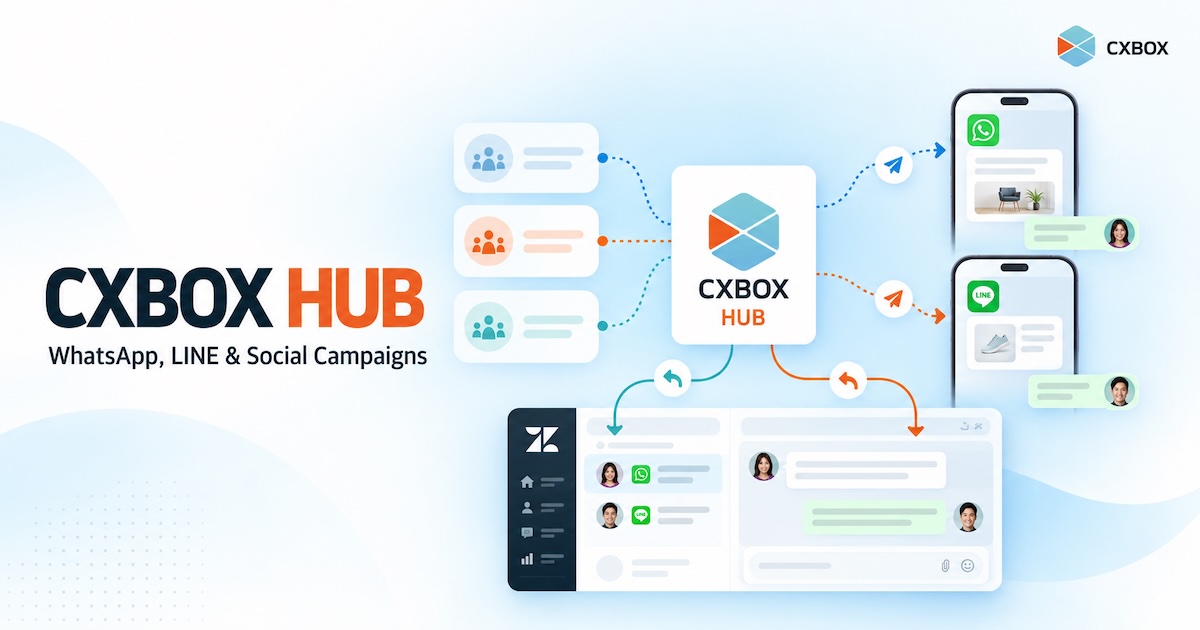
Zendesk helps teams manage customer conversations and service work. CXBOX HUB, developed by DEMETER ICT and listed on the Zendesk Marketplace, adds a way to plan and send targeted outreach across channels including WhatsApp and LINE. The purpose is to connect a campaign with the customer conversation that follows it.
What does CXBOX HUB add to Zendesk?
| Need | How CXBOX HUB helps |
|---|---|
| Reach a relevant audience | Create customer segments using available profile information and connected data, rather than sending every message to every contact. |
| Run outbound campaigns | Prepare and send personalized campaigns through configured social messaging channels, including WhatsApp and LINE. |
| Understand engagement | Review campaign and user engagement insights to inform the next campaign. |
| Handle replies | Configure conversation routing between CXBOX HUB and Zendesk so a customer response can reach the appropriate service workflow. |

From a customer segment to a conversation
Imagine a company with customers who are approaching a subscription renewal. It has customer records in Zendesk, but a generic blast would also reach people who already renewed or are dealing with an unresolved issue. A more useful campaign starts by defining who should receive the reminder and who should be excluded.
In CXBOX HUB, the team can build an audience from the customer information available to its setup, prepare appropriate content, and select a connected channel. Some customers may prefer LINE; others may be reachable through WhatsApp. The team then reviews the campaign and sends it to eligible recipients under each channel’s rules.
What happens after sending matters just as much. If a customer replies, the response may need an agent to answer a billing question, an AI workflow to handle a common request, or a sales representative to discuss an upgrade. CXBOX HUB’s switchboard and channel integration are designed to connect those interactions with the configured Zendesk workflow. The routing should be tested with real scenarios before a large campaign goes live.
WhatsApp, LINE and other channels are not identical
A campaign can have one business goal while its channels require different execution. WhatsApp business-initiated outreach may require approved templates and must follow Meta’s messaging rules. LINE campaigns depend on the connected LINE account, eligible audience and applicable platform rules. Message formats, recipient permissions and delivery options can vary across channels.
CXBOX HUB provides one campaign environment for connected social channels, but it does not remove their individual requirements. Plan the audience, message, consent or eligibility, timing and reply path for each channel before sending.
Practical rule: Build the campaign around a customer need—such as a renewal reminder, relevant announcement or follow-up—then choose the eligible segment and appropriate channel. Sending to more people is not the same as creating a better customer experience.
Where Zendesk fits
Zendesk is the service and conversation layer: agents can work with customer requests, ticket history and configured routing. CXBOX HUB adds campaign planning and outbound social engagement to that environment. The integration lets a business coordinate outreach with follow-up, subject to the account setup and routing it implements.
This distinction matters when choosing a solution. Zendesk’s native proactive messages are aimed at its Web Widget and mobile SDK; a segmented WhatsApp or LINE broadcast is a different workflow. CXBOX HUB is an extension for that broader campaign use case, not a claim that Zendesk natively provides the same campaign features on every channel.

What to check before you launch
- Zendesk and integration requirements: Confirm that your Zendesk account and messaging setup support the required CXBOX HUB integration. The Marketplace listing describes Sunshine Conversations requirements; check your current entitlement and deployment with the team.
- Connected channels: Confirm the WhatsApp, LINE or other social accounts you intend to use and the rules that apply to each.
- Audience quality: Decide which customer data defines eligibility, how records are kept up to date, and which contacts should be excluded.
- Reply ownership: Specify whether replies go to an agent, an AI workflow or another team, and test the handoff in Zendesk.
- Measurement: Agree on what you will review after sending: campaign engagement, replies that need action and the business outcome you were trying to improve.
Frequently asked questions
Is CXBOX HUB a Zendesk app?
Yes. CXBOX HUB is developed by DEMETER ICT and has a listing on the Zendesk Marketplace. The platform and its channel integrations require separate setup.
Can CXBOX HUB send WhatsApp and LINE campaigns?
CXBOX HUB supports personalized outbound campaigns across connected social messaging channels, including WhatsApp and LINE. Availability and sending requirements depend on your plan, channel configuration and each platform’s rules.
Do campaign replies appear in Zendesk?
CXBOX HUB supports routing conversations between CXBOX HUB and Zendesk. How a particular reply is handled depends on the routing and channel integration you configure.
Does CXBOX HUB replace Zendesk?
No. It adds outbound campaign and social engagement capabilities to a Zendesk-based customer service operation.
Sources and further reading: CXBOX HUB product page · CXBOX HUB on Zendesk Marketplace · Zendesk: About proactive messages.